
Alarm That Makes You Walk: How a Step Alarm Gets You Out of Bed
By the Alarmor founder · Sanora Technologies
An alarm that makes you walk will not stop ringing until your phone has counted a set number of real steps. Because you have to get out of bed and keep moving — 15 to 80 steps in Alarmor, depending on difficulty — it is one of the hardest alarms to sleep through. In Alarmor this is the Step Walk mission: steps are counted from your walking rhythm by the phone's motion sensor, so shaking the phone while lying in bed does not count.
Why walking works when other missions do not
Most anti-snooze missions can be finished lying down. You can solve a math problem, tap a pattern or shake a phone without your feet touching the floor — and then roll over. Walking cannot be done from bed. It takes standing up, balance and steady coordination, and by the time you have walked thirty steps you are usually in another room. Getting back under the covers is now a deliberate decision rather than a reflex, which is exactly the gap that heavy sleepers fall into.
How many steps each difficulty asks for
- Easy — 15 steps: out of bed and across the room.
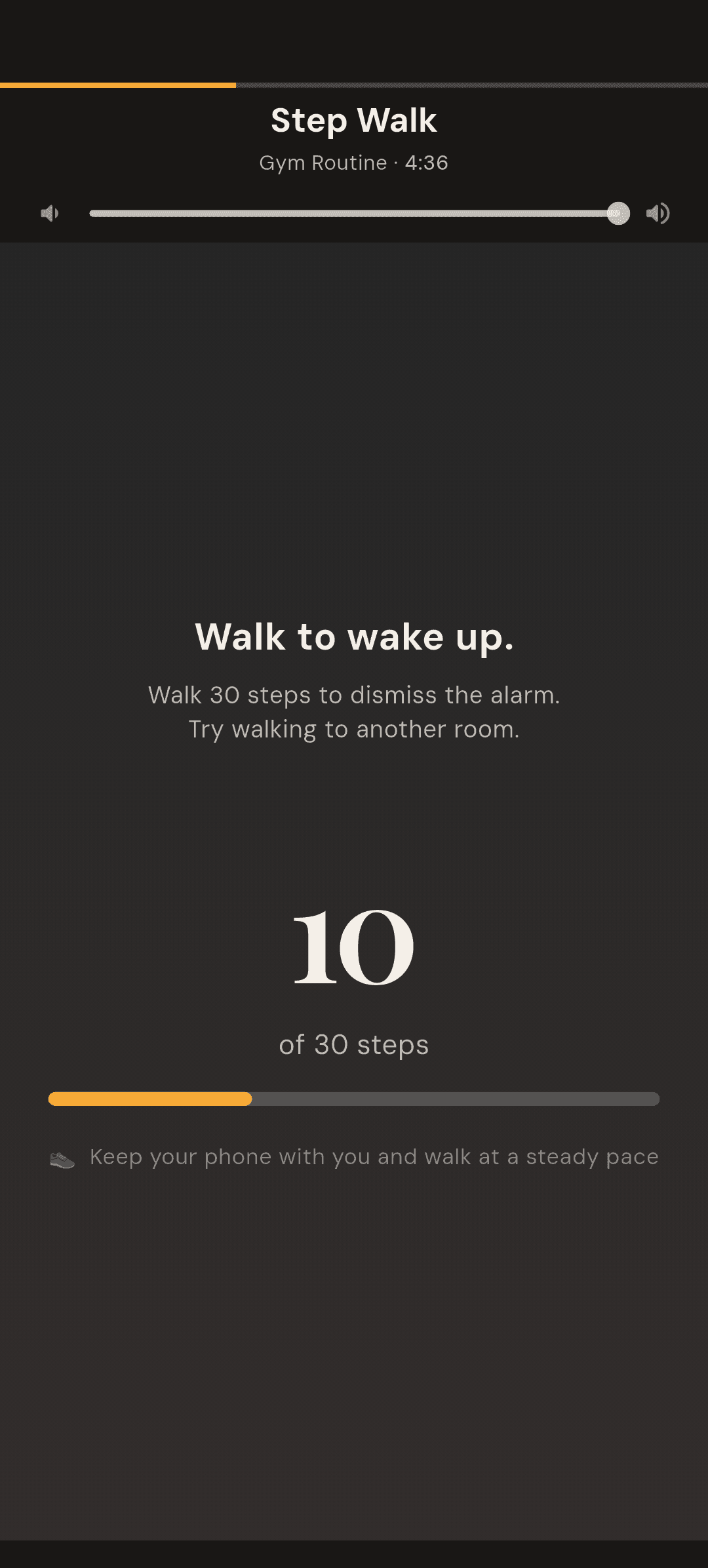
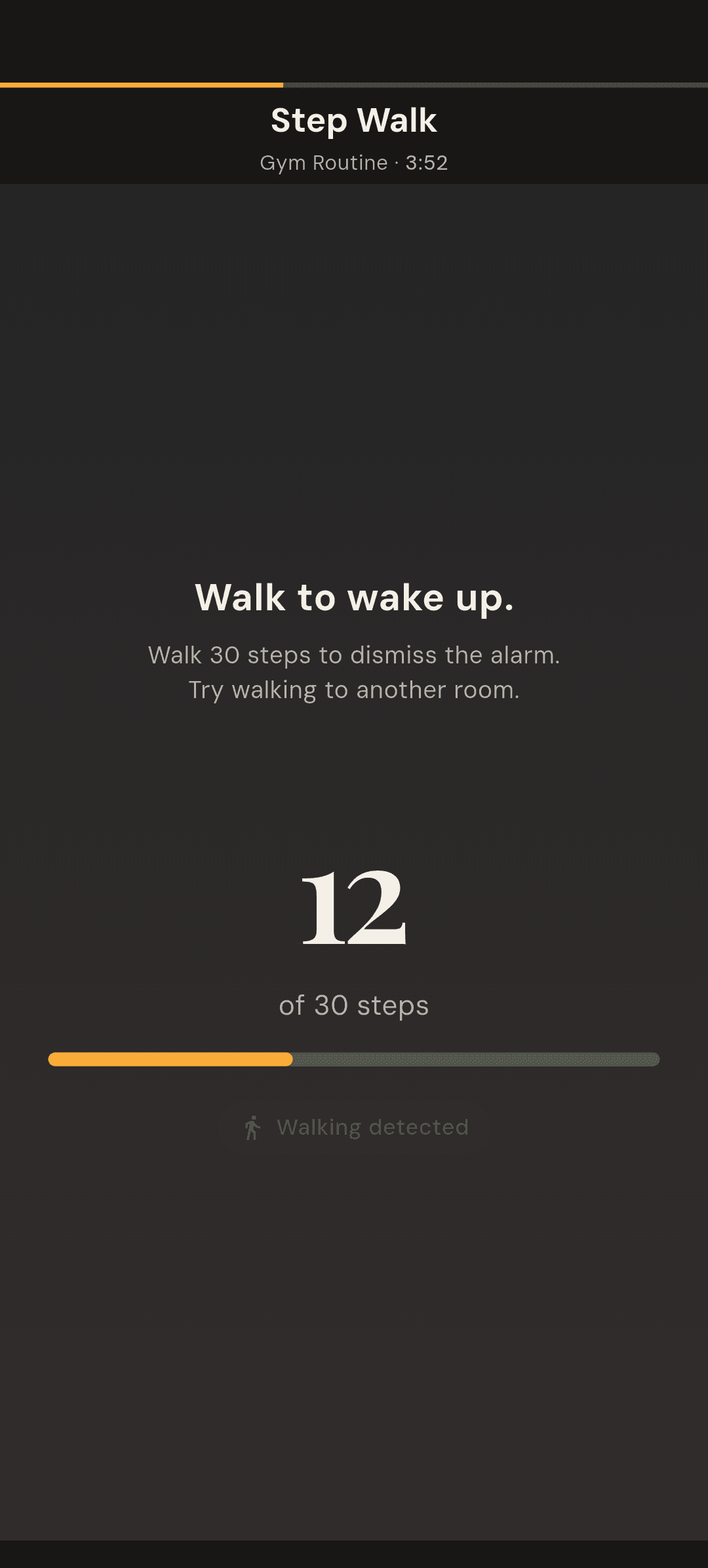
- Medium — 30 steps: the app suggests "Try walking to another room."
- Hard — 50 steps.
- Expert — 80 steps.
How the step counter works — and why shaking the phone does not
The obvious way to cheat a step alarm is to sit in bed and shake the phone. Alarmor's step counter is built so that does not work. It reads the phone's accelerometer and only credits steps once it detects a steady walking rhythm, because a phone jostled in your hand produces the same spike as a footfall — strength alone cannot tell them apart, but cadence can. A shaking hand does not have the rhythm of a walk.
One side effect is worth knowing in advance: for the first few strides of a real walk the counter can stay at zero while it confirms your rhythm, then credit those steps all at once. "Walking detected" appears as soon as your footfalls register, so you know it is working before the number moves.
Tips for getting your steps counted
- Walk at a steady, normal pace — the screen reminds you: "Keep your phone with you and walk at a steady pace."
- Hold the phone fairly still in your hand. If your arm swings a lot, Alarmor will tell you: "Hold your phone still — a swinging arm hides your steps."
- Walk somewhere useful. The kitchen for a glass of water or the bathroom to wash your face turns the steps into the start of your morning.
No fitness or health permission needed
Because steps are counted from the accelerometer rather than Android's built-in step-counter sensor, Step Walk does not ask for the "Physical activity" permission, keeps no step history, and works fully offline. It only listens for steps while the alarm is ringing, so it costs seconds of battery, not hours.
Step alarm vs. QR code alarm vs. shake alarm
- Step alarm — forces you to walk, with no setup and nothing to place in advance. The best choice if your problem is falling back asleep.
- QR code or barcode alarm — forces you to walk to one specific spot, like the bathroom mirror. Stronger if you want a fixed destination, but you have to place the code first.
- Shake to wake — the gentlest physical mission. It can be done without leaving bed, so it suits light sleepers or shared bedrooms.
How to set up a step alarm in Alarmor
- Tap the + button on the Alarms screen and set your wake-up time.
- Tap the Mission card and choose Step Walk from the Physical category. Tap Try first if you want to test it.
- Pick a difficulty. Medium (30 steps) is a good start — enough to get you into another room.
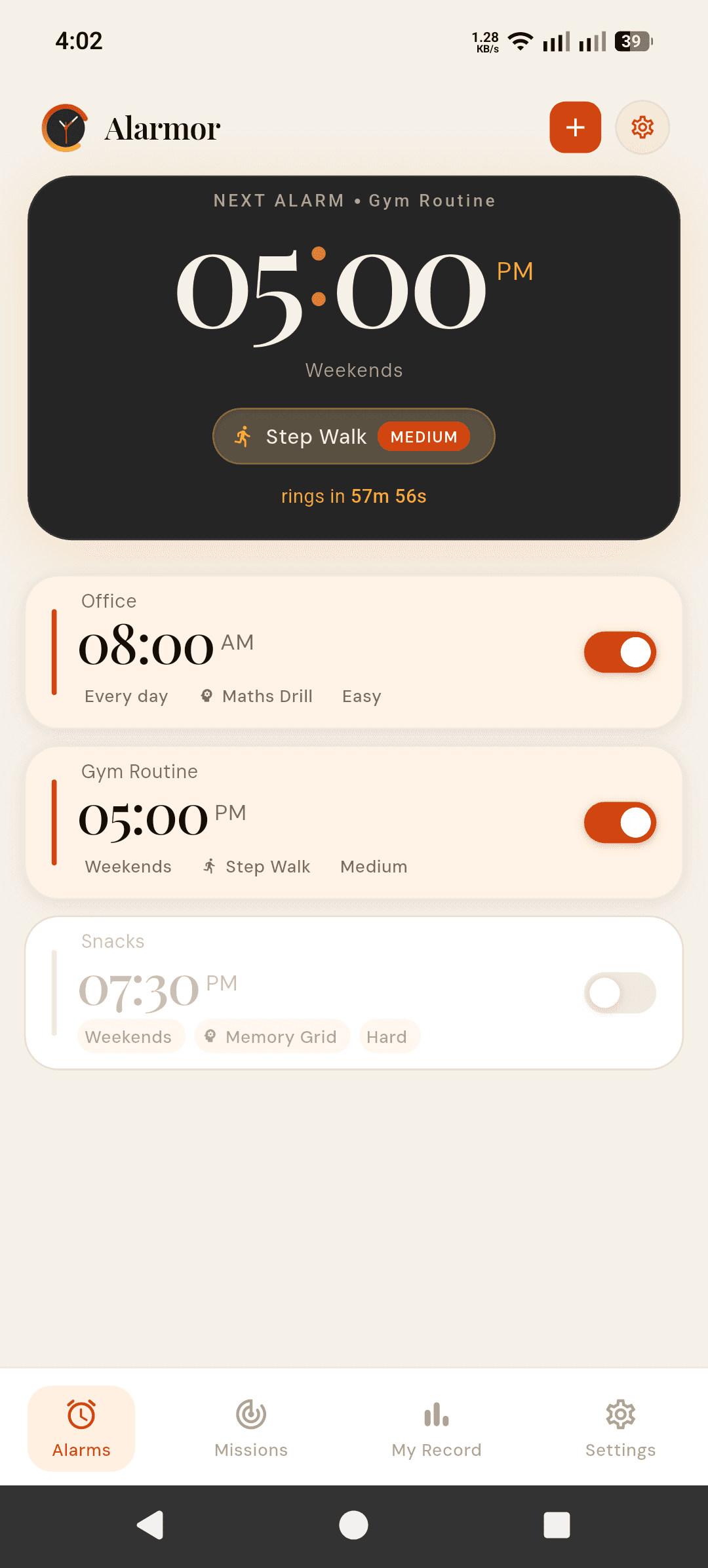
- Tap Save. The next-alarm card shows the mission and difficulty, so you can check it before bed.
Step Walk is part of Alarmor Pro, a one-time purchase with no subscription. If you want to try a physical mission for free first, Shake to Wake and Barcode Scan are both in the free tier of Alarmor, the mission alarm app.
If you genuinely cannot walk
Some mornings walking is not an option — an injury, a tiny hotel room, a sleeping baby on your chest. Alarmor never traps you: if the mission is not finished after five minutes, the alarm dismisses itself and that morning is logged as incomplete in your stats. And if you want more than walking alone, mission stacking in Alarmor Pro can chain Step Walk with a math problem, so you have to be up and thinking before the alarm goes quiet.
Frequently asked questions
Can I cheat a step alarm by shaking my phone?
Not in Alarmor. The Step Walk mission only credits steps when it detects a steady walking rhythm, and a phone shaken in your hand does not have that rhythm — so shaking it in bed does not move the counter.
How many steps do I have to walk to turn off the alarm?
It depends on the difficulty you choose: 15 steps on Easy, 30 on Medium, 50 on Hard and 80 on Expert.
Does a step alarm need a fitness or health permission?
Alarmor's does not. Steps are counted from the phone's accelerometer only while the alarm is ringing, so it does not ask for the Physical activity permission, keeps no step history, and works offline.
Is Step Walk free?
Step Walk is part of Alarmor Pro, a one-time purchase. The free tier includes Shake to Wake and Barcode Scan, which are the closest free alternatives.
What happens if I cannot finish the steps?
If the mission is not completed within five minutes, Alarmor dismisses the alarm automatically and logs that morning as incomplete, so you are never stuck with an alarm you cannot turn off.
Ready to fight back against the snooze button?
Get it on Google Play →