
Shake to Wake: How a Physical Alarm Mission Breaks the Snooze Habit
By the Alarmor founder · Sanora Technologies
·
A Shake to Wake alarm requires you to physically shake your phone a set number of times before the alarm will stop ringing. It works because the required motion cannot be performed accurately while still asleep or half-conscious — it forces you to sit up and move enough to interrupt sleep inertia, without requiring you to get out of bed.
Why shaking works as a wake-up trigger
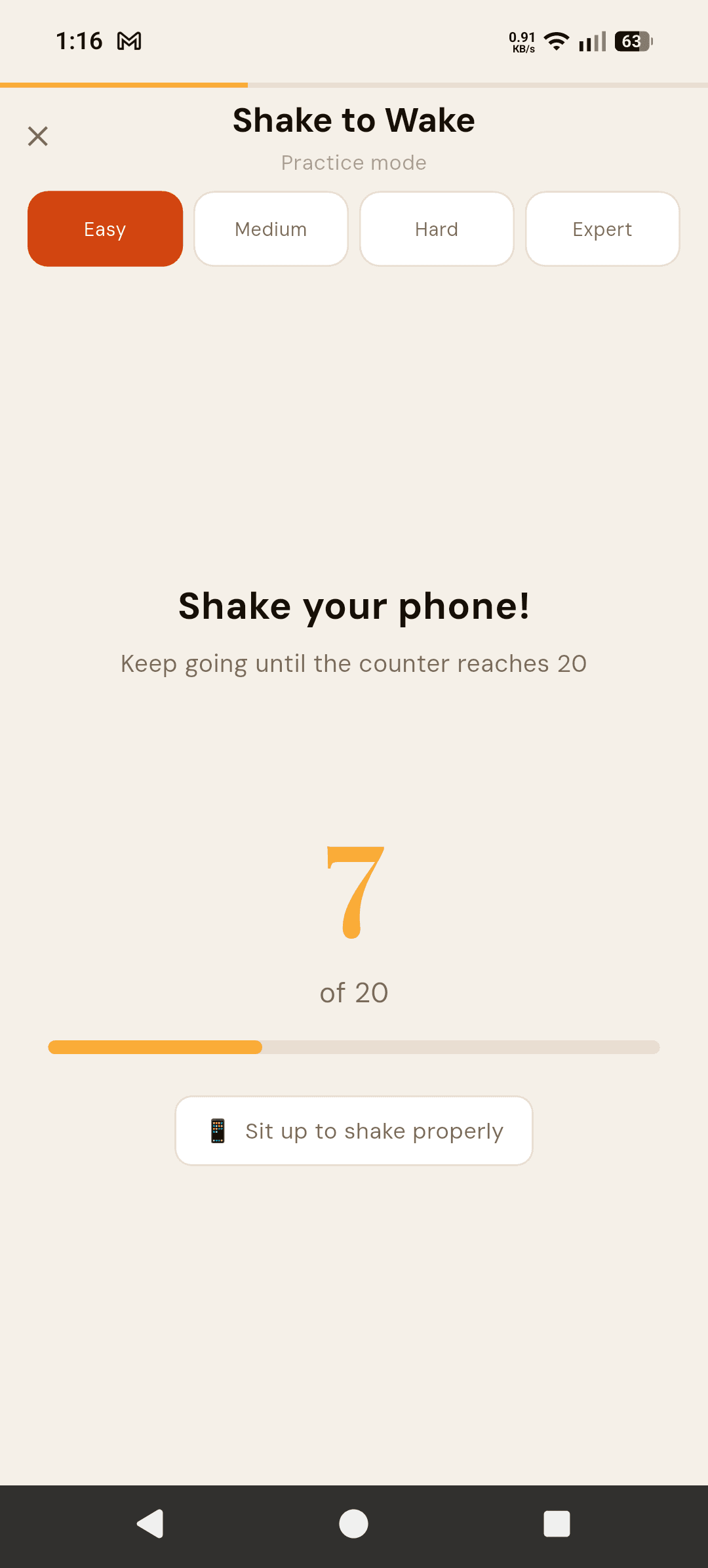
Shake to Wake, one of the free missions in the Alarmor mission alarm app, sits between a passive dismiss tap and a full physical mission like Step Walk. It uses your phone's accelerometer to count deliberate shaking motions, and each shake has to clear a force threshold — small wrist flicks under the covers do not count, which is why the screen tells you to "Sit up to shake properly." The motion has to be sustained and intentional, which is a meaningfully higher bar than tapping a button once.
The accelerometer science, briefly
Your phone's accelerometer measures rapid changes in motion along multiple axes, which is what lets Shake to Wake distinguish a deliberate, sustained shaking motion from an incidental bump or shift while you reach for the phone. The threshold is tuned so that grabbing the phone to silence it accidentally does not count as progress — you actually have to keep shaking it for the required duration or count, which is precisely the small amount of sustained physical effort that a fully passive dismiss tap does not demand.
Who Shake to Wake is best for
It is the best starting point if you want more resistance than a passive alarm but are not ready for a mission that requires getting out of bed, such as a Location mission. It is also a good option for shared bedrooms, since it does not require turning on lights, walking around, or making noise beyond the alarm itself.
How difficulty scales
Easy asks for 20 shakes, Medium for 40, Hard for 60 and Expert for 80, so the mission stays meaningful as you get used to it. There is no way to fail a shake mission — the counter only goes up — and if you genuinely cannot finish, the five-minute fallback dismisses the alarm and logs the morning as incomplete.
How Shake to Wake compares across the Physical category
Alarmor's Physical category has four missions, and each asks for a different kind of effort. Shake to Wake asks for sustained arm motion without requiring you to leave the bed. Step Walk, a Pro mission, goes further by requiring you to actually walk a set number of steps, counted from your walking rhythm — meaningfully harder to fake, since shaking the phone in your hand does not count as steps. Squat Counter asks for a set of squats or jumping jacks, trading duration for intensity. Hold the Button asks for the opposite kind of effort entirely — sustained stillness and attention rather than motion, pressing and holding for a set duration without releasing early. Shake to Wake is the gentlest entry point in the category; Step Walk and Squat Counter are the ones to graduate to once shaking alone stops feeling like enough.
When Shake to Wake is the wrong choice
It is worth being honest about its limits. Because the motion can be done sitting up in bed, Shake to Wake does nothing to physically get you out of bed — if your specific problem is falling back asleep after dismissing the alarm rather than reflexively silencing it, a Location mission that forces you to walk somewhere will address that gap better. It is also, of the four Physical missions, the easiest to eventually perform on near-autopilot once the required motion becomes deeply familiar, which is why pairing it with a second mission via mission stacking is worth considering if it stops feeling effective on its own.
Pairing Shake to Wake with a second mission
If Shake to Wake alone still leaves you sleepy enough to drift off again, mission stacking (an Alarmor Pro feature) lets you chain it with a second mission — for example, requiring the shake sequence first, then a math problem — so you get both the physical jolt and the cognitive check before the alarm goes quiet.
Frequently asked questions
Is Shake to Wake a free mission?
Yes, Shake to Wake at Easy, Medium and Hard difficulty is included in Alarmor's free tier as one of the four missions available without a purchase.
Can I fake the shake motion without actually waking up?
Not easily. Each shake has to clear a force threshold measured by the accelerometer, so small wrist flicks while lying down do not count — you have to sit up and shake properly, 20 to 80 times depending on difficulty.
What is the difference between Shake to Wake and Flip and Hold?
Shake to Wake requires a number of deliberate shaking motions; Flip and Hold requires turning the phone face-down and holding it still for 10 seconds. Both can be done without leaving bed, but they test different kinds of engagement — active motion versus deliberate stillness.
How does Shake to Wake compare to Step Walk?
Shake to Wake only requires sitting up and shaking, so it can be done without leaving bed, while Step Walk requires actually walking a set number of steps, counted from your walking rhythm so shaking the phone does not count. Step Walk is the stronger option if your goal is to guarantee you physically get up, not just wake your arm.
What should I do if Shake to Wake stops feeling effective?
That usually means the motion has become automatic enough to perform half-asleep. Two options: increase the difficulty tier for a higher shake count, or use mission stacking to pair it with a second mission like a math problem so a purely physical response is no longer sufficient on its own.
Ready to fight back against the snooze button?
Get it on Google Play →